Chatbot for IT Support: How to Transform the Modern IT Helpdesk
IT support teams face mounting pressure from every direction. Ticket volumes keep climbing as organizations adopt more technology and remote work becomes standard. The same repetitive requests—password resets, VPN access issues, software installation questions—consume agent time that could address more complex problems. Response times stretch when queues grow, and troubleshooting inconsistency creates frustration when different agents provide different solutions to identical issues.
- What Is a Chatbot for IT Support?
- How a Chatbot for IT Support Works
- Key Benefits of Using a Chatbot for IT Support
- Common Use Cases for IT Support Chatbots
- Where Most IT Support Chatbots Fall Short
- The Role of Structured Workflows in IT Support Automation
- How Process Guidance Powers Reliable IT Support Chatbots
- Using Process Shepherd to Support Chatbot-Driven IT Helpdesks
- Integrating Chatbots into Existing IT Systems
- Is a Chatbot for IT Support Right for Your Organization?
- Conclusion: Chatbots Are Only as Good as the Processes Behind Them
Remote and hybrid work environments have intensified these challenges. Employees scattered across locations and time zones need support outside traditional office hours. The expectation for immediate assistance grows while IT budgets and headcount remain constrained. Teams struggle to maintain service quality while handling exponentially more requests with roughly the same resources.
This is why many organizations are adopting a chatbot for IT support—an AI-powered assistant designed to automate routine helpdesk tasks and guide users through common technical issues. These intelligent tools provide instant responses to standard questions, walk employees through troubleshooting steps, and seamlessly escalate complex cases to human agents when needed. Understanding how IT support chatbots work, where they add value, and what determines their effectiveness helps organizations implement automation that genuinely improves both employee experience and IT efficiency.
What Is a Chatbot for IT Support?
A chatbot for IT support is an AI-powered virtual assistant designed specifically for internal IT helpdesk operations that handles common technical issues automatically, guides employees through troubleshooting processes, and escalates complex cases to human IT agents when necessary. Unlike customer service chatbots that interact with external customers, IT helpdesk chatbots focus on internal employee support for technical problems, access requests, and IT policy questions.
These AI chatbots for IT support serve as the first line of response for employee IT issues, providing immediate assistance for straightforward problems while freeing human agents to focus on situations requiring deeper technical expertise or judgment. They operate through familiar interfaces like Slack, Microsoft Teams, or dedicated support portals where employees already work, making technical help accessible without requiring separate applications or systems.
It’s important to clarify what IT support chatbots are not. They’re not replacements for IT teams—human expertise remains essential for complex troubleshooting, strategic projects, and situations requiring creativity or judgment. They’re not just simple FAQ bots that match keywords to predetermined answers—modern IT chatbots understand context and can guide multi-step processes. They’re not primarily customer service–focused tools adapted for IT—the best solutions are purpose-built for internal technical support scenarios with different requirements than external customer interactions.
How a Chatbot for IT Support Works
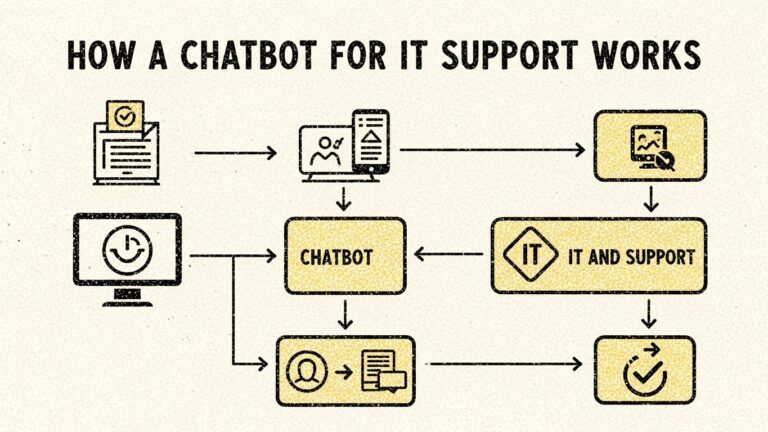
Understanding the mechanics behind IT helpdesk chatbots reveals both their capabilities and limitations.
1. User Request
The process begins when an employee initiates contact through their preferred communication channel. This might be typing a question in Slack like “I can’t connect to the VPN,” sending a message in Microsoft Teams, or starting a conversation through the company’s IT support portal. The chatbot receives this initial request and begins processing.
2. Natural Language Processing (NLP)
The chatbot uses natural language processing to understand what the employee is actually asking. Intent detection determines what the user wants to accomplish—are they trying to reset a password, troubleshoot a connection problem, or request software access? Entity extraction identifies specific details mentioned in the request—which application, which device, which network. Confidence scoring evaluates how certain the system is about its understanding, determining whether it can proceed with assistance or needs to ask clarifying questions.
This NLP capability distinguishes modern chatbots from simple keyword-matching systems. The bot understands “my laptop won’t connect to wifi” and “can’t get online from home” as essentially the same intent despite different wording.
3. Knowledge & Process Retrieval
Once the chatbot understands the request, it retrieves relevant information and procedures from several sources. Knowledge bases provide documented solutions and troubleshooting guides. ITSM workflows define standard processes for handling specific issue types. Predefined troubleshooting processes outline step-by-step diagnostic sequences that systematically eliminate possibilities until identifying root causes.
The quality of this content directly determines how helpful the chatbot can be. A sophisticated AI system with poor underlying documentation and processes provides inconsistent, inaccurate guidance. Conversely, well-structured processes enable even relatively simple chatbots to deliver reliable assistance.
4. Guided Resolution or Escalation
With relevant information retrieved, the chatbot guides the employee through resolution. For straightforward issues, this might be a simple answer or link to instructions. For problems requiring diagnosis, the bot asks contextual follow-up questions that narrow down the cause—”Are you working from the office or remotely?” “Can you access other websites besides this one?” “When did you last successfully connect?”
Based on responses, the chatbot provides appropriate next steps, continuing this interactive troubleshooting until either resolving the issue or determining that human assistance is needed. When escalation is appropriate, the bot seamlessly hands off to human agents, transferring all context so employees don’t repeat themselves.
5. Continuous Learning
Advanced IT support chatbots improve over time by analyzing outcomes. When particular guidance successfully resolves issues, the system reinforces those patterns. When employees consistently abandon certain troubleshooting paths or escalate specific issue types, the system identifies gaps in processes and documentation that need addressing. This learning creates a feedback loop that gradually improves both the chatbot’s responses and the underlying IT support processes.
Key Benefits of Using a Chatbot for IT Support
Organizations implement IT helpdesk chatbots because they deliver tangible improvements across multiple dimensions of IT operations.
24/7 IT support availability means employees get help immediately regardless of when they encounter problems. Someone working late can reset their password at 10 PM without waiting until morning. Remote workers in different time zones access support during their working hours even if those don’t align with IT team schedules. This always-on availability improves productivity by reducing the time employees spend blocked by technical issues.
Faster issue resolution occurs when chatbots handle simple problems instantly rather than requiring employees to wait in support queues. Password resets that might take 20 minutes through traditional ticketing—submit request, wait for agent availability, verify identity, process reset—complete in under a minute through chatbot interaction. This speed compounds across thousands of employee interactions monthly.
Reduced ticket volume frees IT agents from repetitive work that doesn’t require their expertise. When chatbots successfully resolve 30-40% of incoming requests, agents can focus on complex problems, infrastructure projects, and strategic initiatives that create more value than processing routine password resets. This doesn’t necessarily reduce IT headcount but redirects effort toward higher-impact work.
Consistent troubleshooting steps ensure every employee receives the same diagnostic approach and solution recommendations regardless of when they need help or which agent would have handled their ticket. This consistency builds trust and eliminates the frustrating experience of getting different answers from different agents for identical problems.
Lower IT support costs emerge from handling more requests with existing resources. While chatbot implementation requires investment, the ongoing cost per interaction drops significantly compared to human agent time. Organizations typically see ROI within months through labor savings and productivity improvements.
Better employee experience results from immediate help, consistent service, and reduced friction in getting technical issues resolved. Employees appreciate not having to wait or navigate complex ticketing systems for simple problems. Satisfaction with IT support improves when most interactions are quick and effective.
Improved SLA adherence becomes achievable when chatbots handle high-volume simple requests instantly, preventing them from consuming the time budget that impacts response times for complex issues. Meeting service level agreements becomes easier when routine volume doesn’t create backlogs.
Common Use Cases for IT Support Chatbots
IT support chatbots excel at specific scenarios where problems follow predictable patterns and solutions can be defined clearly.
Password Resets & Account Unlocks
The single most common IT support request across organizations, password resets represent the ideal chatbot use case. The process follows clear steps—verify identity, confirm account details, initiate reset, confirm success. Chatbots handle these instantly through secure identity verification, eliminating wait times and freeing agents from this repetitive work. Account unlocks after too many failed login attempts follow similar patterns with equally straightforward automation.
VPN, Wi-Fi, and Connectivity Issues
Network connectivity problems often involve systematic troubleshooting that chatbots can guide effectively. The bot asks diagnostic questions—are other devices connecting successfully, does your device show available networks, have you recently changed locations—that narrow possibilities. Based on responses, it provides appropriate troubleshooting steps like restarting devices, forgetting and reconnecting to networks, or verifying VPN credentials. When basic troubleshooting doesn’t resolve issues, the bot escalates with context about what’s already been tried.
Software Installation & Access Requests
Employees frequently need access to new applications or help installing software. Chatbots can verify eligibility, check licensing availability, initiate provisioning workflows, and provide installation instructions with relevant download links and setup steps. For standard business applications with documented installation processes, this automation replaces manual ticketing with instant, guided assistance.
Device Setup & Onboarding
New employee onboarding involves significant IT setup—configuring laptops, connecting to networks, installing standard applications, setting up email and collaboration tools. Chatbots guide new hires through these processes step-by-step, reducing the IT agent time required per new employee while ensuring consistent, complete setup. This scales particularly well for organizations with frequent hiring or seasonal workforce fluctuations.
IT Policy & Compliance Questions
Employees regularly need clarification about IT policies, security requirements, and compliance procedures. Chatbots provide instant answers about password requirements, acceptable use policies, data handling procedures, and security best practices. This information delivery doesn’t require agent expertise and benefits from consistent, up-to-date responses drawn from authoritative policy documentation.
Where Most IT Support Chatbots Fall Short
Despite their potential, many organizations discover their IT helpdesk chatbots underperform expectations due to fundamental challenges that AI sophistication alone can’t solve.
Inconsistent troubleshooting steps plague chatbots when the underlying processes aren’t well-defined or standardized. If the chatbot’s troubleshooting sequence differs from what human agents would follow, employees get confused when escalating issues because they’ve already tried different steps than agents expect. This disconnect creates frustration and inefficiency.
Outdated or incomplete instructions cause chatbots to provide guidance that no longer works because software versions changed, systems were updated, or procedures evolved. When documentation doesn’t match reality, chatbot responses erode trust. Employees learn to bypass the bot and go straight to human agents, defeating the automation’s purpose.
Hard-coded logic that’s difficult to maintain creates operational challenges as IT environments evolve. When chatbot responses are programmed directly into the AI configuration, updating them requires technical expertise and often vendor involvement. This inflexibility means simple process changes require lengthy update cycles, leaving the chatbot providing incorrect information in the interim.
Knowledge bases that don’t reflect real workflows disconnect chatbot guidance from actual IT operations. Formal documentation often describes ideal processes while real work follows unofficial shortcuts or workarounds. When chatbots reference formal documentation that agents don’t actually follow, escalations create friction and repetition.
Chatbots and human agents following different processes fundamentally undermines the entire automation strategy. If the bot troubleshoots connectivity issues one way while agents use different diagnostic sequences, neither the bot’s preparatory work nor the employee’s effort translates smoothly when escalation occurs. This duplication wastes time and damages user experience.
The effectiveness of a chatbot for IT support depends less on AI sophistication—and more on the quality of the processes behind it. The most advanced natural language processing can’t compensate for poorly defined troubleshooting procedures or outdated documentation.
The Role of Structured Workflows in IT Support Automation
Recognizing that chatbots execute processes rather than create them shifts focus to the workflows that determine automation success.
Chatbots don’t exercise intuition or judgment—they execute decisions based on predefined logic. Every “step-by-step instruction” a chatbot provides comes from a workflow someone designed. Every diagnostic question follows branching logic someone mapped. The bot’s reliability depends entirely on the quality of these underlying structures.
Poorly defined processes produce unreliable chatbot responses. If troubleshooting workflows skip steps, contain ambiguous decision points, or fail to handle common exceptions, the chatbot inherits these flaws. Employees quickly lose confidence when chatbot guidance doesn’t consistently work.
Structured workflows for IT support automation require several key elements. Decision trees map logical paths through troubleshooting processes, defining which questions lead to which next steps based on answers. Conditional logic handles variations in situations—different operating systems, user roles, network locations—that require different approaches. Compliance checkpoints ensure security and policy requirements get enforced—identity verification before password resets, manager approval for software installations, documentation of sensitive actions.
Exception handling defines what happens when standard processes don’t apply or when situations fall outside normal parameters. Without clear exception paths, chatbots either make incorrect assumptions or escalate prematurely because they can’t recognize which uncommon situations they can handle versus which genuinely require human intervention.
Human-bot alignment ensures that when chatbots escalate issues, human agents continue from the same logical point rather than starting over. This requires both bot and human following identical workflows so the agent understands exactly what diagnostic steps occurred and what conclusions the bot reached before escalation.
Organizations investing in structured workflow development create IT support chatbots that don’t just automate—they automate reliably. Those deploying chatbots without this foundation often find their bots creating as many problems as they solve.
How Process Guidance Powers Reliable IT Support Chatbots
The distinction between chatbot platforms and the processes they execute reveals an architectural approach that improves both reliability and maintainability.
Process guidance platforms don’t replace chatbots—they manage the logic that chatbots consume. Think of chatbots as the interface layer where employees interact, while process guidance systems are the execution layer that defines what happens during those interactions. This separation allows both chatbots and human agents to follow identical workflows, ensuring consistency regardless of whether automation or people handle specific situations.
Centralized process design means IT support workflows exist in one authoritative location rather than scattered across chatbot configurations, knowledge base articles, and agent training materials. When troubleshooting procedures need updating, changes propagate automatically to all channels—chatbot responses, agent guidance, and documentation—maintaining alignment.
Version control and updates become manageable when processes exist as structured data rather than hard-coded chatbot logic. IT teams can modify workflows without AI reconfiguration, test changes before deployment, and roll back if issues emerge. This agility allows processes to evolve at the pace of IT operations rather than the pace of chatbot vendor releases.
Compliance and audit readiness improve when process executions—whether by chatbot or human—create consistent records showing exactly which steps occurred, which decisions were made, and whether required procedures were followed. This visibility matters for security, regulatory compliance, and continuous improvement.
Shared execution between chatbots and IT agents means the bot doesn’t follow different troubleshooting logic than agents use. When escalation occurs, agents see the same workflow the bot was executing, understand where the bot concluded escalation was necessary, and continue seamlessly from that point. This alignment eliminates the inefficiency of repeated steps and the frustration of employees explaining situations multiple times.
Using Process Shepherd to Support Chatbot-Driven IT Helpdesks
Process Shepherd functions as the process execution layer that makes IT support chatbots reliable and maintainable at scale. Rather than being a chatbot itself, Process Shepherd provides the structured workflows that chatbots consume and that human agents follow when handling escalations or issues outside automation scope.
The platform enables IT teams to design troubleshooting workflows using interactive decision trees that map every step from problem identification through resolution. These workflows account for variations in situations, define clear escalation criteria, and embed compliance requirements that must be satisfied regardless of who or what executes the process.
Keeping instructions current becomes straightforward when workflows exist as structured processes rather than scattered documentation. When software updates change procedures, IT teams update the workflow once and the change applies everywhere—chatbot responses, agent guidance, knowledge base references. This maintainability prevents the drift where chatbots provide outdated information because updating them is too cumbersome.
Supporting escalation paths ensures smooth handoffs when chatbots determine human help is needed. Process Shepherd maintains context about which workflow was being executed, what steps completed, what information was gathered, and where the process requires human judgment. Agents receiving escalations see this complete picture rather than starting fresh with employees who must re-explain everything.
Aligning chatbot and human support behavior ensures consistency across channels. Both automation and people follow identical troubleshooting logic, ask the same diagnostic questions in the same sequence, and apply the same criteria for determining next steps. Employees experience predictable, professional support regardless of whether a bot or human helps them.
For organizations running chatbot-driven IT helpdesks, Process Shepherd addresses the workflow quality and consistency challenges that determine whether automation actually improves operations or creates new frustrations. The combination—chatbots handling interface and AI capabilities, Process Shepherd managing execution logic and process alignment—creates reliable automation that IT teams can trust and employees appreciate.
Integrating Chatbots into Existing IT Systems
Technical integration determines whether chatbots can actually execute processes effectively or remain isolated tools with limited practical value.
ITSM tools like ServiceNow, Zendesk, and Freshdesk manage tickets, track incidents, and document resolutions. Chatbots must integrate with these systems to create tickets for escalations, update status as issues progress, and close tickets when automation resolves problems. Without this integration, chatbot interactions exist separately from official IT records, creating gaps in documentation and making performance analysis difficult.
Communication tools including Slack and Microsoft Teams provide the interfaces where employees actually interact with chatbots. Integration allows employees to get help without leaving their normal working environment, dramatically improving adoption compared to requiring separate support portals or applications. Natural presence in collaboration tools makes IT help feel accessible rather than requiring context switching.
Knowledge bases store troubleshooting guides, policy documentation, and reference information that chatbots must access to provide accurate guidance. Integration allows bots to pull current, authoritative content rather than working from static information that becomes outdated. This connection ensures chatbot responses reflect the organization’s actual IT knowledge.
Identity and access systems enable chatbots to verify who employees are, what permissions they have, and what resources they should access. This integration allows secure automation of sensitive operations like password resets and access provisioning without requiring manual verification that would defeat efficiency gains.
Yet integration alone doesn’t guarantee effectiveness. A chatbot perfectly connected to all systems still provides inconsistent, unhelpful service if the underlying processes are poorly defined. Technical integration enables automation, but process quality determines whether that automation creates value or frustration. Organizations succeeding with IT support chatbots invest in both the technical connections and the workflow structures that make those connections useful.
Is a Chatbot for IT Support Right for Your Organization?
Not every organization benefits equally from IT support chatbot implementation. Several factors determine readiness and potential impact.
Team size influences ROI calculations. Larger IT teams supporting hundreds or thousands of employees see faster payback from automation that handles high absolute volumes of repetitive requests. Smaller organizations with modest ticket volumes may struggle to justify implementation investment, though cloud-based chatbot solutions with lower upfront costs make automation accessible even at smaller scales.
Ticket volume and composition determine automation potential. Organizations where 40-50% of tickets involve standard, repeatable issues like password resets and access requests benefit enormously from chatbots handling this volume. Teams where most tickets involve unique, complex problems requiring judgment see less benefit since fewer interactions suit automation.
Process maturity significantly impacts success likelihood. Organizations with documented, standardized troubleshooting procedures can automate effectively because clear processes exist to execute. Teams relying heavily on individual agent expertise and undocumented tribal knowledge struggle because chatbots have nothing reliable to automate. Investing in process documentation and standardization before implementing chatbots often makes more sense than expecting chatbots to magically create consistency.
Compliance requirements in regulated industries or sensitive environments may either drive chatbot adoption—by enforcing consistent processes that meet requirements—or constrain it if security policies restrict AI systems’ access to necessary information. Understanding these constraints early prevents discovering incompatibilities after implementation.
Chatbots for IT support work best when handling structured, repeatable issues where solutions can be defined clearly. They deliver strongest results when paired with process discipline that defines how troubleshooting should work rather than leaving everything to individual judgment. Organizations with these characteristics see substantial benefits from IT helpdesk automation. Those without them might address foundational process challenges before implementing chatbots that will only automate existing inconsistency.
Conclusion: Chatbots Are Only as Good as the Processes Behind Them
Chatbots improve IT support efficiency by providing instant, consistent help for common technical issues while freeing human agents for complex problem-solving that requires expertise and judgment. The technology has matured to where natural language understanding, multi-step guidance, and seamless escalation work reliably in production environments.
Yet AI sophistication alone doesn’t guarantee successful automation. The fundamental lesson from organizations both succeeding and struggling with IT support chatbots is that execution quality depends on process quality. Advanced AI executing poorly defined workflows produces unreliable, frustrating automation. Straightforward chatbots executing well-structured processes deliver consistent, valuable assistance.
Structured workflows determine whether chatbots provide accurate troubleshooting guidance, whether they handle exceptions appropriately, whether escalations to human agents flow smoothly, and whether employees trust automation enough to use it rather than bypassing it for direct human contact. Organizations investing in clear, executable processes create IT support chatbots that are not just automated—but reliable, scalable, and trusted.
The path forward for IT organizations exploring chatbot automation involves parallel investments in both the AI interfaces where employees interact and the structured processes that define what happens during those interactions. Combining capable chatbot platforms with process guidance systems like Process Shepherd creates the foundation for automation that genuinely transforms IT support operations rather than simply adding another tool that disappoints expectations.



