What is Contact Center Software? Benefits, Features, and Top Platforms

If you run a contact center, you already know that keeping customers happy is no small feat. Calls come in, chats pile up, tickets get routed — and somewhere in the middle of all that, your team is expected to deliver fast, consistent, and friendly service every single time. That’s exactly what contact center software is built for.
From managing inbound calls to supporting live chat, email, and social messaging, modern contact center platforms have become the backbone of customer experience operations across industries.
Cloud contact center software and AI contact center software have completely transformed what’s possible — making it easier than ever to scale support, automate repetitive tasks, and analyze every customer interaction in real time.
But here’s the thing: even the best contact center software in the world can’t save a team that’s struggling with messy internal processes. If escalations are inconsistent, agents are working from memory, or cross-team handoffs fall through the cracks — no platform is going to fix that on its own.
In this guide, we’ll cover everything you need to know about contact center software: what it is, what the top platforms offer, and the operational layer that most contact centers are still missing.
What Is Contact Center Software?
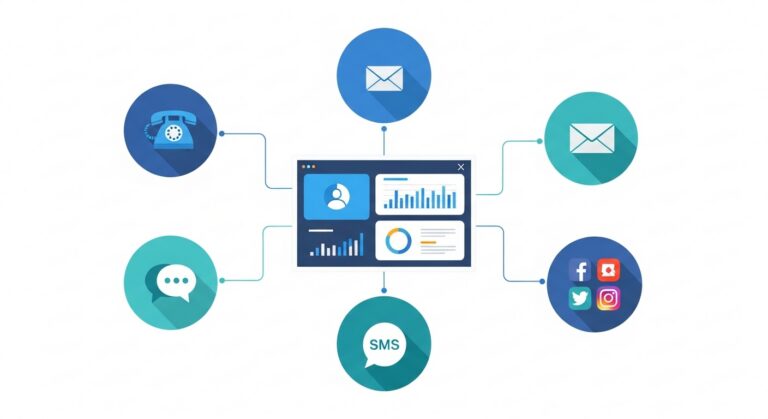
Contact center software is a technology platform that helps businesses manage customer interactions across multiple communication channels — including phone, email, live chat, SMS, and social media.
Think of it as the central hub where your support and sales teams operate. It handles everything from routing incoming calls to tracking ticket histories and generating performance reports.
Over the past decade, contact center software has evolved significantly. What used to be a simple call center software solution, focused purely on voice, has grown into a full omnichannel contact center experience that meets customers wherever they are.
Today, most modern platforms are delivered as CCaaS (Contact Center as a Service), meaning they’re cloud-based, subscription-based, and accessible from anywhere. This shift away from on-premise infrastructure has made it far easier for businesses of all sizes to deploy and scale their operations.
Call Center Software vs. Contact Center Software
These two terms are often used interchangeably, but there’s a meaningful difference. Call center software is focused specifically on voice — inbound and outbound phone calls. Contact center software is broader, covering all digital channels in addition to voice.
As customer expectations have shifted toward omnichannel engagement, the demand for full contact center platforms over standalone call center software has grown substantially.
Contact Center vs. CRM: What’s the Difference?
A CRM (Customer Relationship Management) system stores customer data — purchase history, contact details, account status. A contact center platform manages real-time customer communications. The two are complementary: your CRM tells your agents who the customer is; your contact center software handles the conversation itself.
Feature | Contact Center Software | CRM |
Primary Purpose | Manages real-time interactions | Stores customer data & history |
Channels Covered | Phone, chat, email, SMS, social | Typically email & sales pipelines |
Best For | Support & service teams | Sales & account management |
Used Together? | Yes — integrates with CRM | Yes — pulls data into contact center |
Core Features of Modern Contact Center Software
Not all contact center platforms are built the same, but the best ones share a common set of capabilities. Here’s what to look for:
IVR Systems (Interactive Voice Response) greet incoming callers with automated menus, gather information, and route them to the right agent or department. A well-configured IVR reduces wait times — but it only works if the underlying routing logic is clean.
Automatic Call Distribution (ACD) intelligently routes calls based on agent availability, skill set, or customer priority. It’s the engine behind efficient queue management and a critical feature for high-volume teams.
Omnichannel contact center capabilities unify all channels — phone, chat, email, SMS — into a single agent view, preserving context across every customer touchpoint.
AI contact center software encompasses intelligent chatbots, sentiment analysis, predictive routing, and real-time agent assistance. AI routing improves speed, but without structured escalation workflows, tickets can still bottleneck at the human level.
Workforce management software helps forecast call volume, schedule the right number of agents, and track adherence in real time. Good WFM tools find the balance between understaffing and overstaffing.
Contact center analytics & reporting give visibility into average handle time, first contact resolution (FCR), agent performance, CSAT scores, and more. The key is not just having the data — it’s acting on it consistently.
CRM integrations pull customer records instantly so agents always have context before they answer. Deep integration reduces handle time and improves the overall experience.
Cloud vs. On-Premise Contact Center Software: Which Is Better?
The debate between cloud contact center software and on-premise solutions has largely been settled — but the right choice still depends on your needs.
Factor | Cloud (CCaaS) | On-Premise |
Upfront Cost | Low — subscription-based | High — hardware & licensing |
Scalability | Easily scalable | Requires infrastructure investment |
Maintenance | Handled by vendor | Managed by your IT team |
Deployment Speed | Days to weeks | Weeks to months |
Security Control | Shared responsibility model | Full control, full responsibility |
Remote Access | Built-in, anywhere | Requires VPN or extra setup |
For most businesses today — especially those with distributed teams or growth ambitions — cloud contact center software is the clear winner. The agility it offers can’t be matched by traditional on-premise infrastructure.
Top Contact Center Software Providers in 2026
There are a lot of strong players in the contact center space. Here’s a quick overview of the most widely used platforms:
Genesys — Enterprise-grade platform with deep omnichannel and AI capabilities. Best for large organizations with complex routing needs.
NICE CXone — Cloud-native platform known for analytics and workforce management. Strong choice for compliance-heavy industries.
Salesforce Service Cloud — Ideal for teams already embedded in the Salesforce ecosystem. CRM-first approach with strong automation features.
Zendesk — Popular among mid-market support teams for its user-friendly interface and strong ticketing capabilities.
Talkdesk — Modern CCaaS platform with strong AI tools and fast deployment. A good fit for growing teams.
Twilio Flex — Highly customizable cloud platform for developers. Best for teams with engineering resources to build tailored experiences.
Five9 — Reliable cloud contact center with strong inbound call center software and outbound dialing features.
Nextiva — Solid choice for small to mid-sized businesses looking for a unified communications and contact center solution.
Aircall — Lightweight and easy to deploy, well-suited for sales and support teams that want quick setup and CRM integration.
Each of these platforms has real strengths. The right fit depends on your team size, channel mix, existing tech stack, and budget.
The Hidden Problem Most Contact Centers Face
Here’s something that doesn’t get talked about enough: you can invest in the best contact center software available and still struggle with poor performance.
Why? Because technology is only part of the equation.
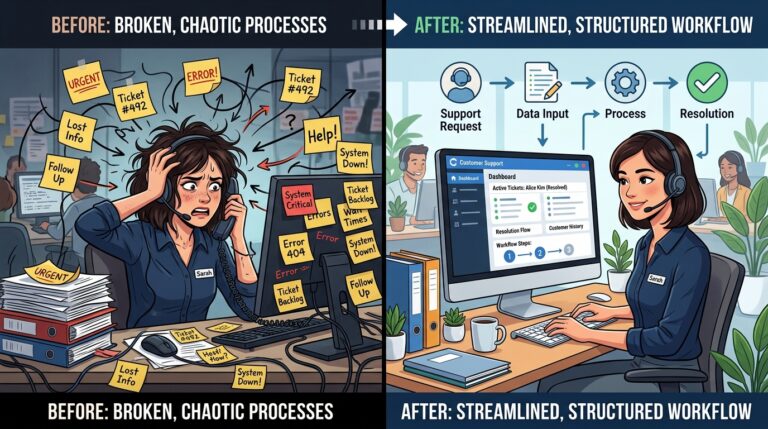
Most contact centers hit a wall when it comes to contact center operational efficiency — not because their software is lacking, but because their internal processes are inconsistent, undocumented, or broken. Common culprits include:
Escalations that depend on tribal knowledge rather than defined workflows
QA reviews that are ad hoc and inconsistently applied
Knowledge bases that are outdated, scattered, or simply ignored
Cross-team handoffs that fall through the cracks
Agent onboarding that takes weeks because there’s no standardized system
These are operational problems, not software problems. And they directly impact your ability to improve first contact resolution, reduce call center costs, and hit your operational targets.
Why Contact Center Software Alone Doesn’t Fix Workflow Chaos
There’s a common misconception in the industry: that buying better technology equals better operations. It doesn’t.
Here’s the distinction worth understanding:
Routing ≠ resolution. You can route a ticket to the right agent, but if that agent doesn’t have a clear process to follow, outcomes are still inconsistent.
Data ≠ accountability. Analytics dashboards tell you what happened, but they don’t ensure your team follows through on improvements.
AI ≠ process design. AI can automate tasks, but it can’t replace the need for well-designed, documented workflows that both humans and systems can follow reliably.
The missing layer isn’t more software. It’s workflow orchestration — the system that bridges the gap between your contact center platform and the way your team actually operates day to day. This is exactly where Process Shepherd comes in.
How Workflow Automation Transforms Contact Center Performance
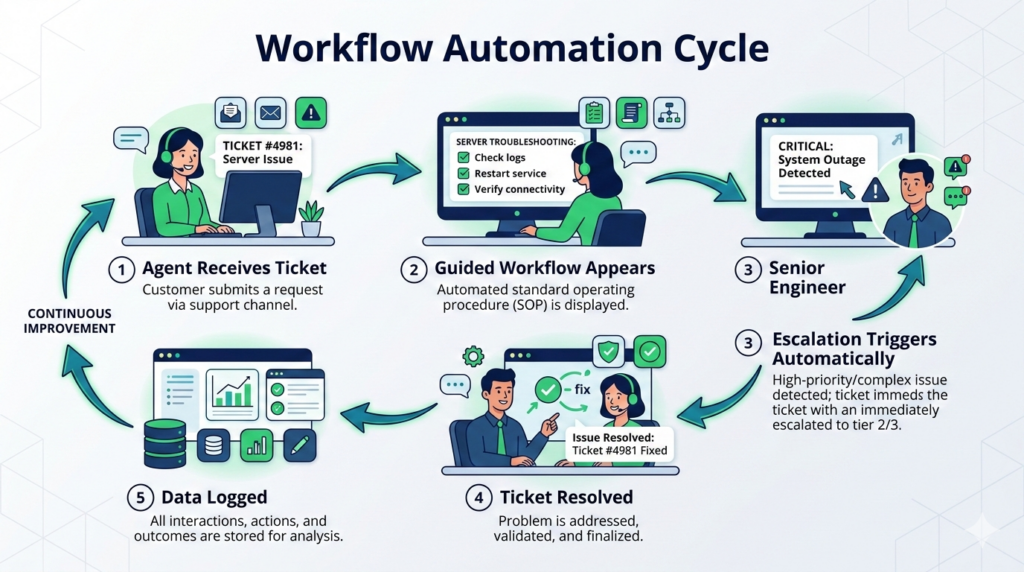
When you layer structured contact center workflow automation on top of your contact centre software, everything becomes more consistent — and more efficient.
- Escalation Workflow Automation: Instead of agents guessing who to escalate to or when, structured multi-level resolution workflows define exactly what happens at each stage. SLA triggers fire automatically. Compliance is documented without anyone having to think about it. Escalations stop slipping through the cracks.
- QA & Compliance Process Automation: Automated scorecard routing, structured review cycles, and performance feedback loops mean QA stops being something that happens occasionally and becomes a continuous, systematic part of how your contact center runs.
- Agent Onboarding & SOP Systemization: New agents are expensive to train and easy to lose. Standardized playbooks and automated training sequences mean your onboarding process is consistent regardless of who’s doing the training — and ramp time drops significantly. Teams using Process Shepherd have reported cutting onboarding time by up to 80%.
- Cross-Department Coordination Workflows: Contact centre workflow management gets especially tricky when issues span multiple teams — sales, support, billing, logistics. Clearly defined handoff workflows with ticket ownership accountability stop these scenarios from becoming customer-experience disasters.
- ROI Modelling: How Automation Reduces Cost Per Ticket: The financial case for contact center process automation is straightforward. Consider a team handling 10,000 tickets per month at an average handle time of 8 minutes. If structured workflows shave just 90 seconds off each ticket, that’s 250 hours saved per month. At a loaded labor cost of $25/hour, that’s $75,000 in annual savings from a single efficiency improvement — before accounting for reduced errors, better FCR, and lower attrition.
With so many platforms on the market, it’s easy to get lost in feature comparisons. Here’s a practical checklist:
Channel requirements — Which channels do you need today? Which will you need in 12–18 months?
Integration stack — Does it connect cleanly with your CRM, helpdesk, and other tools?
Automation capabilities — Can you automate routing, follow-ups, and ticket management within the platform?
Workflow flexibility — Does the platform support custom workflows, or are you locked into its defaults?
Reporting depth — Can you measure the metrics that actually matter to your business?
Scalability — Will it grow with you without a painful migration?
Total cost of ownership — Look beyond the license fee. Factor in implementation, training, maintenance, and integrations.
One more thing worth emphasizing: don’t just evaluate features — evaluate system architecture. A platform flexible enough to accommodate your actual workflows is far more valuable long-term than one with a flashier feature set.
For contact centers focused on process compliance and agent guidance, it’s also worth exploring dedicated tools like Process Shepherd — which layers structured, dynamic workflows on top of your existing contact center platform, ensuring agents always know exactly what to do next.
Frequently Asked Questions About Contact Center Software
What is the best contact center software? There’s no single “best” — it depends on your team size, channels, budget, and use case. Genesys and NICE CXone are strong for enterprise teams. Zendesk and Talkdesk work well for mid-market. Aircall and Nextiva are solid for smaller teams. The best contact center software is the one that fits your specific operational needs and integrates well with your existing tools.
Which software is used in a call center? Call centers traditionally rely on ACD, IVR systems, and CRM integrations. Popular platforms include Five9, Genesys, Talkdesk, and Twilio Flex. Many modern call centers are also layering in AI contact center software to automate repetitive interactions and assist agents in real time.
What is the difference between CRM and contact center software? A CRM stores customer information — history, preferences, purchase data. Contact center software manages live customer interactions — calls, chats, emails. The two work together: your CRM provides context; your contact center software handles the conversation.
What is cloud contact center software? Cloud contact center software (CCaaS) is a platform delivered over the internet rather than hosted on-premise. It requires no hardware, scales easily, and can be accessed from anywhere. Most modern contact center platforms are now cloud-based.
Is there free call center software? Yes, some platforms offer free tiers or trials — though they’re typically limited in features or call volume. Freshdesk, HubSpot Service Hub, and some open-source ACD solutions offer entry-level free options. For growing teams, paid platforms generally offer better reliability, integrations, and support.
What is AI contact center software? AI contact center software uses artificial intelligence to automate and enhance customer interactions. This includes chatbots, sentiment analysis, real-time agent assistance, and predictive routing that matches customers to the best available agent.
Final Thoughts
Contact center software manages interactions. Workflow automation manages performance. Both matter — but they solve different problems.
The platforms covered in this guide are excellent tools. They give your team the infrastructure to handle volume, track data, and serve customers across every channel. But infrastructure alone doesn’t create consistent, high-quality outcomes. That requires systems.
Modern contact centers that are winning on customer experience aren’t just buying better software — they’re designing better processes. They’re documenting SOPs, automating escalations, standardizing QA, and creating the operational clarity that lets their agents focus on what actually matters: the customer in front of them.
That’s the operational layer most contact centers are still missing. And it’s exactly what Process Shepherd is built to provide — sitting alongside your contact center platform and turning your team’s workflows from something agents have to remember into something the system guides them through, every time.



