Online Decision Tree Maker: Create, Manage, and Execute Decisions
Use Process Shepherd’s Online Decision Tree Maker
Empower your support team with Process Shepherd’s no-code workflow decision tree tool. To see how it works, you can get started now with a free trial.
Table of Contents
- Use Process Shepherd’s Online Decision Tree Maker
- What Is an Online Decision Tree Maker?
- How Online Decision Tree Makers Work
- Two Types of Online Decision Tree Makers
- Common Use Cases for Online Decision Tree Makers
- Why Customer Support Teams Use Online Decision Tree Makers
- Key Features to Look for in an Online Decision Tree Maker
- Static Templates vs Live Decision Tree Execution
- FAQs About Online Decision Tree Makers
- Get Started With Process Shepherd
An online decision tree maker is software that runs in your browser and helps teams build, update, and apply decision logic across their operations. Unlike traditional diagramming tools that create static flowcharts for planning purposes, modern online decision tree makers are designed for execution—guiding agents through customer support calls, helping teams troubleshoot technical issues, and standardizing complex operational workflows in real time.
These tools have evolved beyond simple visualization. While early decision tree software focused on drawing boxes and arrows for planning sessions, today’s platforms guide people through actual decisions during their daily work. The difference matters: a diagram explains how something should work, while an interactive decision tree ensures it actually works that way every time.
This guide covers what online decision tree makers do, how they work, the key differences between types, and what to look for when evaluating tools for your team.
What Is an Online Decision Tree Maker?
An online decision tree maker is a web-based software tool used to create and manage decision trees that guide users through consistent choices and outcomes. These platforms help teams document decision logic, maintain it centrally, and deploy it where people actually work—whether that’s a help desk platform, CRM system, or standalone interface.
The “online” distinction matters for practical reasons. Browser-based tools require no installation, making them accessible from any device without IT involvement. Easy sharing means multiple team members can collaborate on building and refining decision trees simultaneously. Centralized updates ensure everyone sees the latest version immediately when processes change. Real-time collaboration allows distributed teams to work together on complex workflows without version control nightmares.
Offline tools like desktop software or Excel-based flowcharts still exist but create friction at scale. Manual version control becomes unmanageable when multiple people need to update processes. Distribution challenges emerge when you need to ensure 50 agents are all following the current procedure. These limitations explain why most organizations have moved to online decision tree makers for operational workflows.
Visual vs Interactive Decision Trees
Understanding the difference between visual and interactive decision trees shapes how you evaluate tools. Visual decision trees are diagrams you look at—they communicate structure and logic but require users to interpret and apply them manually. Interactive decision trees are systems you use—they present questions, evaluate responses, and guide users step-by-step through decisions without requiring them to remember or interpret anything.
This distinction determines whether a decision tree serves as reference documentation or as an active guidance system during live work.
How Online Decision Tree Makers Work
Online decision tree makers structure decisions through four core components that work together to guide users from question to outcome.
Decision nodes represent questions the tool presents to users. These might be yes/no choices, multiple-choice selections, or data inputs depending on what information the decision requires. In customer support, a decision node might ask “Is the customer calling about billing or technical support?” In troubleshooting, it might ask “Is the device powered on?”
Conditions define rules the system checks based on answers, inputs, or integrated data. Simple conditions evaluate direct responses—if the user selects “billing,” route to the billing workflow. Complex conditions can pull data from connected systems—if the customer’s account status equals “premium,” show different options than for standard accounts.
Outcomes specify actions, recommendations, or next steps when the decision tree reaches an endpoint. Outcomes might provide instructions to follow, trigger automated actions in connected systems, or route to specialized workflows. In a help desk context, outcomes could be resolution steps, escalation procedures, or knowledge base articles.
Branching logic determines how the tool routes users automatically based on their responses. Each answer leads to the next relevant question or outcome, creating a path through the decision tree that adapts to the specific situation. This automation eliminates the cognitive load of figuring out “what do I do next?” during complex processes.
Real-Time Guidance vs Static Diagrams
The true value of online decision tree makers emerges during live work rather than planning sessions. Static diagrams serve as reference material—useful for understanding processes but requiring users to remember and apply logic manually. Interactive decision trees provide active guidance during actual work—presenting the next question or instruction exactly when needed without requiring memorization.
This distinction matters most in high-pressure environments like live customer calls, urgent support tickets, or time-sensitive operational processes. When an agent is on the phone with a frustrated customer, they can’t pause to study a flowchart. They need step-by-step guidance that appears in real time as they progress through the conversation.
Two Types of Online Decision Tree Makers
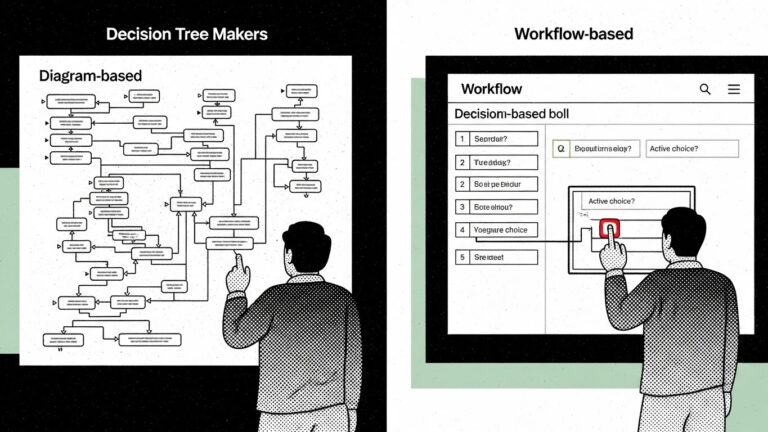
Online decision tree makers fall into two categories based on their primary purpose: planning and communication versus execution and operations.
Diagram-Based Decision Tree Tools
Diagram-based tools prioritize visual design and are best for brainstorming sessions, planning initiatives, presentations to stakeholders, and high-level process analysis. These platforms offer drag-and-drop layouts that make it easy to create professional-looking flowcharts quickly. They follow a design-first philosophy where appearance and clarity for viewers matters most.
The limitation is that these diagrams require manual interpretation during actual work. Someone must look at the flowchart, understand the current situation, determine which path applies, and then remember what to do. This works fine for planning but creates friction during execution.
Workflow-Based Decision Tree Tools
Workflow-based tools prioritize execution and are designed for operations, training, live customer interactions, and ensuring consistent process execution. These platforms guide users step by step through decisions without requiring them to interpret diagrams or remember procedures. They enforce rules and consistency automatically, reducing decision fatigue by presenting only relevant options at each step.
Workflow-based decision trees function as active systems rather than passive documentation. They don’t just show what should happen—they make it happen by guiding users through each step in real time.
For call centers and BPO operations, workflow-based decision tree makers are particularly valuable. Process Shepherd specializes in this space, providing guided workflows that help helpdesk agents handle complex customer interactions with confidence and consistency. Rather than memorizing scripts or procedures, agents follow interactive decision trees that adapt to each customer situation in real time.
Ready to transform your call center workflows? Try Process Shepherd free and see how interactive decision trees reduce training time while improving first-call resolution.
When Each Makes Sense
Visual tools excel at planning and communication—mapping out new processes, getting stakeholder buy-in, and documenting high-level logic. They’re the right choice when the goal is understanding or explaining rather than executing.
Workflow tools excel at live work and operational consistency—guiding agents through support calls, standardizing troubleshooting procedures, and ensuring compliance during regulated processes. They’re the right choice when the goal is execution at scale with minimal training.
Common Use Cases for Online Decision Tree Makers
Online decision tree makers serve diverse purposes across industries, though some use cases align better with different tool types.
Business Planning and Strategy
Organizations use decision tree makers to map strategic scenarios, evaluate options during planning cycles, and communicate decision frameworks to leadership teams. Visual decision tree tools work well here since the goal is analysis and communication rather than day-to-day execution.
Risk Assessment and Analysis
Risk management teams build decision trees to standardize risk evaluation processes, document approval workflows, and ensure consistent criteria application across the organization. Both visual and workflow-based tools find applications depending on whether the priority is documenting policy or enforcing it during actual risk decisions.
IT Troubleshooting and Technical Support
IT teams create decision trees that guide technicians through diagnostic procedures, reduce time spent on common issues, and ensure thorough troubleshooting before escalation. This is where interactive decision trees perform best, providing real-time guidance during support sessions rather than serving as reference documentation.
Customer Support and Help Desks
Support teams use decision trees to standardize responses across agents, reduce new hire training time, and maintain consistency during complex customer interactions. The operational nature of customer support makes workflow-based decision tree tools particularly valuable—agents need guidance during live calls, not diagrams to study between them.
Process Shepherd was built specifically for this use case. Call centers and BPOs handling helpdesk services use Process Shepherd to create decision trees that guide agents through everything from password resets to complex technical troubleshooting, billing disputes to escalation procedures.
Call Center Workflows
Call centers would implement an online decision tree maker for call routing, quality assurance, compliance requirements, and handling the variety of scenarios agents encounter daily. This is where interactive decision trees perform best, transforming complex procedures into step-by-step guidance that works under pressure.
BPO operations serving multiple clients benefit particularly from decision tree makers that can maintain separate workflows for each client while ensuring agents follow the correct procedures regardless of which account they’re servicing.
Managing multiple client workflows? Process Shepherd lets you create, organize, and deploy decision trees for every client and scenario your BPO handles. Start your free trial today.
Why Customer Support Teams Use Online Decision Tree Makers
Customer support teams gravitate toward online decision tree makers for operational outcomes that directly impact their key metrics.
Reduced training time accelerates agent productivity by providing guidance during actual work rather than expecting memorization of complex procedures. New agents can handle sophisticated customer issues earlier in their tenure when decision trees guide them through each step. Organizations report training time reductions of 50-80% when combining traditional onboarding with embedded decision tree guidance.
Consistent responses build stronger brand trust by ensuring every customer receives the same quality of service regardless of which agent handles their call or ticket. Consistency also simplifies quality assurance since supervisors can verify that agents followed the standard process rather than improvising.
Faster resolution improves both efficiency and customer experience by eliminating the time agents spend searching for information, asking supervisors for guidance, or second-guessing their decisions. Decision trees present the next step immediately, maintaining conversation flow and reducing average handle time.
Compliance and accuracy lower operational risk by building requirements directly into workflows rather than relying on agents to remember them. Regulated industries particularly value this capability—a decision tree can enforce required disclosures, mandatory verification steps, and documentation standards automatically.
For call centers and BPOs, these benefits translate directly to competitive advantage. Process Shepherd helps helpdesk operations reduce average handle time by 30-40% while improving quality scores and customer satisfaction ratings. The interactive guidance ensures even new agents can deliver consistent, professional service from day one.
Key Features to Look for in an Online Decision Tree Maker
Evaluating online decision tree makers requires understanding which features matter for your specific use case and team needs.
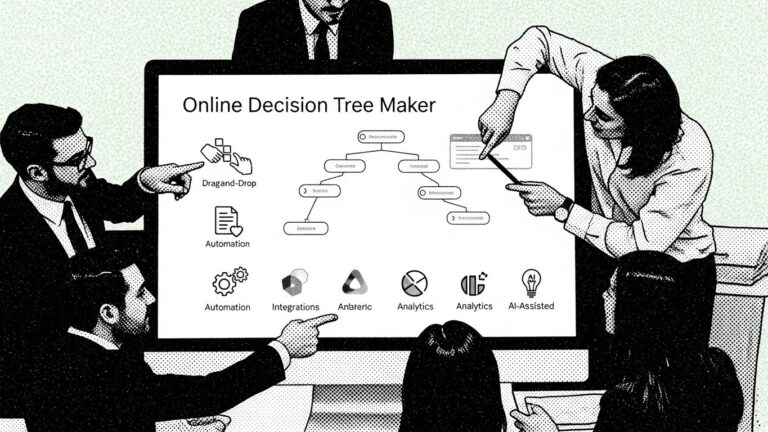
Does it offer a no-code editor? Business teams need the ability to build and update decision trees without relying on developers. Drag-and-drop interfaces, visual editors, and template-based creation enable subject matter experts to maintain workflows themselves. Technical flexibility matters too—some scenarios require custom logic that visual editors can’t express, so API access or scripting capabilities provide necessary escape hatches.
Are there templates for common scenarios? Starting from blank canvases slows adoption and increases inconsistency. Quality decision tree makers include templates for frequent use cases like password resets, billing inquiries, technical troubleshooting, or employee onboarding. Templates accelerate implementation while establishing best practices.
Process Shepherd provides pre-built templates specifically for call center operations, including common helpdesk scenarios that BPOs can customize for their specific client needs.
Can it automate routing or actions? Advanced platforms integrate with other systems to trigger actions based on decision tree outcomes. This might mean creating tickets in your help desk, updating CRM records, sending notifications, or routing to specialized teams. Automation transforms decision trees from guidance tools into operational systems that actually execute processes.
Does it integrate with help desk or CRM tools? Standalone tools create friction by requiring agents to switch between systems. The most effective decision tree makers embed directly into the platforms agents already use—appearing within ServiceNow, Zendesk, Salesforce, or other business systems. This integration eliminates context switching and duplicate data entry.
Are there analytics and usage insights? Understanding how decision trees perform in practice enables continuous improvement. Analytics should reveal which paths users follow most frequently, where they get stuck or abandon processes, how long decisions take, and whether outcomes achieve desired results. This data identifies training opportunities and process improvements.
Process Shepherd includes built-in analytics that show exactly how agents use each decision tree, which branches lead to successful resolutions, and where additional training or process refinement might be needed.
Does it support AI-assisted creation or optimization? Emerging platforms use AI to suggest decision tree structures based on existing documentation, identify gaps or inconsistencies in logic, and recommend optimizations based on usage patterns. While not essential, AI assistance can accelerate creation and improve quality.
Want to see these features in action? Schedule a demo to see how Process Shepherd’s call center-specific features help BPOs and helpdesks standardize operations.
Static Templates vs Live Decision Tree Execution
The distinction between static templates and live execution systems reveals different approaches to process management.
Static templates function as documentation—downloadable flowcharts, PDF procedures, or knowledge base articles that describe how processes should work. They’re valuable for understanding and planning but require users to interpret and apply them manually during actual work. Templates work when processes are simple, infrequent, or performed by experienced team members who need occasional reference material.
Live execution creates operational systems where decision trees actively guide users through processes in real time. Instead of reading about what to do, users answer questions and follow instructions that appear step-by-step. Live systems work when processes are complex, frequently performed, or executed by team members with varying experience levels.
The operational advantages of live execution compound at scale. Change management becomes manageable because updates deploy instantly to all users rather than requiring redistribution of documents and retraining. Consistency improves because the system enforces the current process rather than relying on individual interpretation. Performance under pressure increases because guidance appears exactly when needed rather than requiring users to remember procedures while handling stressful situations.
Organizations often start with static templates and migrate to live execution as they scale, as processes become more complex, or as consistency becomes strategically important. For call centers and BPOs where every call represents a customer experience opportunity, live execution through tools like Process Shepherd ensures consistent quality across hundreds or thousands of daily interactions.
FAQs About Online Decision Tree Makers
Is there a free online decision tree maker?
Yes, many tools offer free plans with limits on features, users, or execution capabilities. Free tiers typically suit individual use or small team evaluation but lack the integration, analytics, and collaboration features needed for operational deployment at scale. Process Shepherd offers a free plan for up to 5 users with 20 workflows, perfect for testing with a small team before scaling across your operation.
What’s the difference between a flowchart and a decision tree?
Flowcharts map processes linearly, showing sequences of steps including decisions, actions, and flows. Decision trees focus specifically on choices and their outcomes, emphasizing the branching logic rather than sequential steps. In practice, many tools support both formats depending on what you’re trying to communicate.
Can online decision tree makers integrate with existing software?
Integration capabilities vary widely by platform. Some offer native integrations with popular help desk and CRM systems, while others provide APIs for custom connections. Evaluate integration requirements early since embedded decision trees that work within existing tools drive higher adoption than standalone systems. Process Shepherd integrates with major helpdesk platforms used by BPOs, bringing guided workflows directly into the systems agents already use.
How do you maintain decision trees as processes change?
Online decision tree makers centralize maintenance so updates apply immediately across all users. Version control features track changes over time, allowing teams to review what changed, when, and by whom. The best practices include designating clear ownership for each decision tree, establishing regular review cycles, and building approval workflows for changes to critical processes.
Are decision tree makers suitable for regulated industries?
Yes, particularly workflow-based tools that enforce compliance requirements within the decision tree itself. Regulated industries benefit from audit trails showing that agents followed required procedures, version control documenting what process was in effect when, and the ability to embed mandatory disclosures or verification steps that can’t be skipped. Call centers handling healthcare, financial services, or telecommunications support particularly benefit from this compliance enforcement.
What’s the learning curve for building decision trees?
Visual, diagram-based tools typically have shallow learning curves—if you can use basic diagramming software, you can create decision trees. Workflow-based tools designed for execution may require more investment to understand branching logic, conditions, and integrations, but this complexity enables operational capabilities that simple diagrams can’t provide. Process Shepherd balances ease of use with power through its no-code editor designed specifically for call center workflows, allowing supervisors and trainers to build decision trees without technical expertise.
How quickly can you deploy decision trees in a call center?
Deployment speed depends on complexity and integration requirements. Simple decision trees for common scenarios can be built and deployed in hours. Complex workflows with multiple integrations may take days to weeks. Process Shepherd’s template library and call center-specific design allow BPOs to deploy initial decision trees within days and continuously add new workflows as needs evolve.
Get Started With Process Shepherd
Process Shepherd is the online decision tree maker built specifically for call centers, BPOs, and helpdesk operations. Our platform helps you create interactive decision trees that guide agents through every customer interaction with confidence and consistency.
Key benefits for call center operations:
- Reduce agent training time by up to 80%
- Improve first-call resolution rates
- Ensure compliance across all customer interactions
- Standardize processes across multiple clients and locations
- Deploy updates instantly to all agents
Whether you’re managing an in-house call center or running a BPO serving multiple clients, Process Shepherd provides the specialized decision tree capabilities you need to deliver consistent, high-quality helpdesk services.
Start your free trial — No credit card required. Up to 5 users and 20 workflows free forever.
Schedule a demo — See how Process Shepherd transforms call center operations in a personalized walkthrough.



